Hey there! If you’re reading this, you’ve probably experienced the frustration of waking up to 500 new user signups on your website—only to realize 499 of them are robots trying to sell cheap sunglasses or post shady links.
It’s incredibly annoying, right?
But don’t worry! By the end of this guide, you are going to learn how to build a rock-solid anti-spam signup system that keeps the bad bots out while letting your real, human users breeze right through. And the best part? You don’t need a PhD in cybersecurity to understand this. We are going to break it down step-by-step, just like we’re sitting together having a coffee. ☕
Let’s dive into the brilliant hacks of 2026 that actually work!
What Exactly is an Anti-Spam Signup System? 🛡️
Simply put, an anti-spam signup system is a collection of security guards (code and tools) that check out every visitor who tries to create an account on your website.
Imagine hosting an exclusive party. You wouldn’t just leave the front door wide open for anyone—or any thing—to walk in and trash the place. You’d have a bouncer, a guest list, and maybe a secret knock.
In the web world, bots (automated software programs) roam the internet looking for unprotected forms. When they find one, they fill it with garbage data. An effective system stops them in their tracks before they ever make it into your database. (anti-spam signup system)
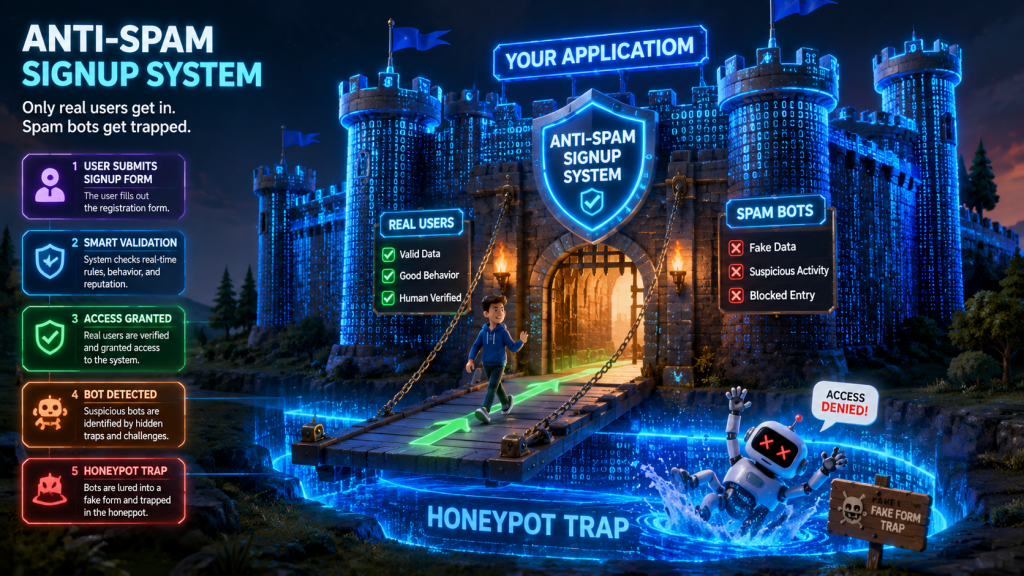
Why You Need “Layered” Security (The Castle Analogy) 🏰
Here is a big secret in the web development world: There is no single magic bullet that stops 100% of spam.
If you only rely on one method (like asking users to type wavy letters), the smarter bots of 2026 will eventually figure it out. That’s why the best strategy is Layered Security.
Think of your website like a medieval castle. You wouldn’t just build a wall and call it a day. You’d have a moat, a drawbridge, tall walls, and guards. If an invader gets past the moat, the walls are waiting for them.
In our anti-spam signup system, our layers are:
The Honeypot (The hidden tripwire)
reCAPTCHA (The smart guard)
DNS Validation (The background check)
Spam Scoring (The security camera)
Silent Bans (The trap door)
Ready to build your castle? Let’s go!
Why You Need “Layered” Security (The Castle Analogy) 🏰
Hack #1: The Sneaky Honeypot Trap 🍯
Bots are fast, but they aren’t always smart. They are programmed to look at the code of your website, find every blank input field, fill it with text, and hit “Submit.” (anti-spam signup system)
We can use this greed against them using a Honeypot.
How it Works
A honeypot is an invisible field on your signup form. Human users can’t see it because we hide it using CSS (the styling language of the web). Because humans can’t see it, they leave it blank.
But bots? They read the raw code. They see the field, think “Aha! A place to type my spam!”, and fill it out.
If your website receives a form where the hidden honeypot field is filled out, you know with 100% certainty that a bot submitted it. Boom! Instant block.
The Code Example
Here is how you can easily add a honeypot to your HTML form (anti-spam signup system):
HTML
<!-- Your normal signup form --><formaction="/signup"method="POST"><labelfor="username">Username:</label><inputtype="text"id="username"name="username"required><labelfor="email">Email Address:</label><inputtype="email"id="email"name="email"required><!-- THE HONEYPOT TRAP (Hidden from humans) --><!-- We give it a realistic name like 'website_url' to trick the bot --><divstyle="display:none; visibility:hidden;"><labelfor="website_url">Leave this field blank if you are human:</label><inputtype="text"id="website_url"name="website_url"tabindex="-1"autocomplete="off"></div><buttontype="submit">Create Account</button></form>
And in your backend code (like Node.js or PHP), you simply check:
JavaScript
// A simple Node.js backend checkapp.post('/signup', (req, res) => {consthoneypot = req.body.website_url;// If the honeypot has ANY text in it, it's a bot!if (honeypot && honeypot.length > 0) {console.log("Bot detected by Honeypot!");returnres.status(403).send("Spam detected."); }// Otherwise, continue creating the account for the human...createNewUser(req.body);});
It’s incredibly easy to implement and catches a massive chunk of lazy bots! If you want a deeper dive on form security, the experts at webdevservices.in
have some fantastic resources on building secure web applications.
Hack #2: Smart Captchas (No More Traffic Lights!) 🚦
Remember the old days when you had to click on pictures of traffic lights, crosswalks, or buses to prove you were human? It was exhausting! (anti-spam signup system)
In 2026, a modern anti-spam signup system shouldn’t torture real users. Instead, we use invisible, behavior-based verifications like Google’s reCAPTCHA v3 or Cloudflare Turnstile.
How it Works
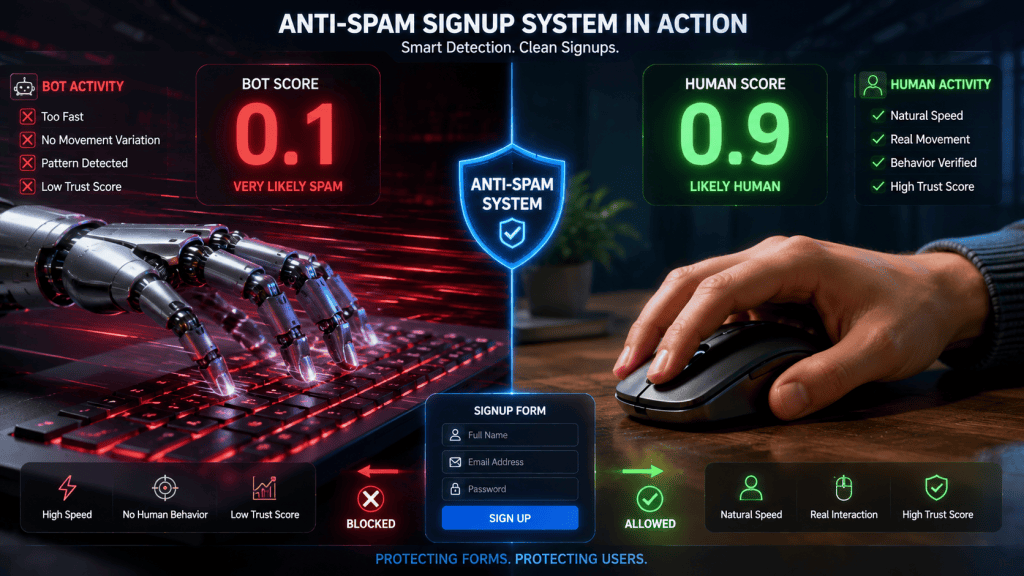
These tools run silently in the background. They track how a user interacts with the page—how the mouse moves, how fast they type, and where they click. Bots move in perfectly straight lines and type instantly. Humans are beautifully imperfect; our mouse wiggles, we pause to think, and we make typos.
The tool calculates a “Human Score” from 0.0 (definitely a bot) to 1.0 (definitely human). You get to decide what score passes your test!
The Code Example
Here is a conceptual look at how you verify a reCAPTCHA v3 token on your server:
JavaScript
asyncfunctionverifyHumanity(recaptchaToken) {constsecretKey = "YOUR_SECRET_KEY";// Ask Google if this user is a bot or a humanconstresponse = awaitfetch(`https://www.google.com/recaptcha/api/siteverify`, {method:'POST',headers: { 'Content-Type':'application/x-www-form-urlencoded' },body:`secret=${secretKey}&response=${recaptchaToken}` });constdata = awaitresponse.json();// Check the score (0.0 to 1.0)if (data.success && data.score > 0.5) {returntrue; // Likely a human! } else {returnfalse; // Likely a bot! }}
Hack #2: Smart Captchas (No More Traffic Lights!) 🚦
Hack #3: DNS Validation (Checking Their ID) 🆔
Sometimes, sneaky bots use fake email addresses to sign up. They might use something like [email protected].
How do we know if that email provider even exists? We use DNS Validation.
How it Works
Every real email provider (like Gmail, Yahoo, or Outlook) has something called an MX Record (Mail Exchange record) registered on the internet. It’s basically an official ID badge that says, “Yes, we are a real server that can receive emails.” (anti-spam signup system)
When a user signs up, your system can quickly ask the internet: “Hey, does the domain superfakewebsite12345.com actually have the ability to receive emails?”
If the answer is no, you block the signup!
The Code Example
Here is how you can check MX records using Node.js:
JavaScript
constdns = require('dns');functionisEmailDomainReal(email) {returnnewPromise((resolve) => {// Extract the domain (everything after the @ symbol)constdomain = email.split('@')[1];// Check the internet for Mail Exchange (MX) recordsdns.resolveMx(domain, (error, addresses) => {if (error || addresses.length === 0) {// No MX records found? It's a fake domain!console.log(`Fake domain detected: ${domain}`);resolve(false); } else {// MX records found! It's a real email provider.resolve(true); } }); });}
Hack #4: Weighted Spam Scoring 🧮
Now that we have multiple layers in our anti-spam signup system, we need a way to combine them. If we just block someone for one tiny mistake, we might accidentally block a real user (we call this a “false positive”).
Instead, we use Weighted Spam Scoring. We assign “suspicion points” for different bad behaviors. If the total points go over a certain limit, then we block them.
Example Scoring System
Here is a handy table to show how you might score a signup attempt:
Behavior Detected
Suspicion Points
Note
Honeypot Filled Out
+50 points
Huge red flag. Almost certainly a bot.
Invalid DNS / No MX Record
+30 points
Fake email address domain.
Typing speed < 2 seconds
+20 points
Too fast for a human to fill out 4 fields.
IP Address used 5 times today
+15 points
Might be a human sharing Wi-Fi, or a bot.
reCAPTCHA score < 0.5
+25 points
AI suspects non-human behavior.
The Rule: If a user gets 50 points or more, they are blocked!
This prevents us from blocking a human who just happened to type really fast (20 points), but successfully catches a bot that types fast AND uses a fake email (20 + 30 = 50 points).
Hack #5: The “Silent Ban” Strategy 🤫
Okay, so your system caught a bot. What do you tell them?
Amateur move: Showing a giant red error message that says, “YOU HAVE BEEN DETECTED AS A BOT AND BLOCKED!”
Why is this bad? Because the hacker who programmed the bot will see that message and say, “Oh, they blocked me. Let me rewrite my code to be sneakier.” You are giving the bad guys feedback!
Pro move: The Silent Ban (also known as Shadowbanning).
How it Works
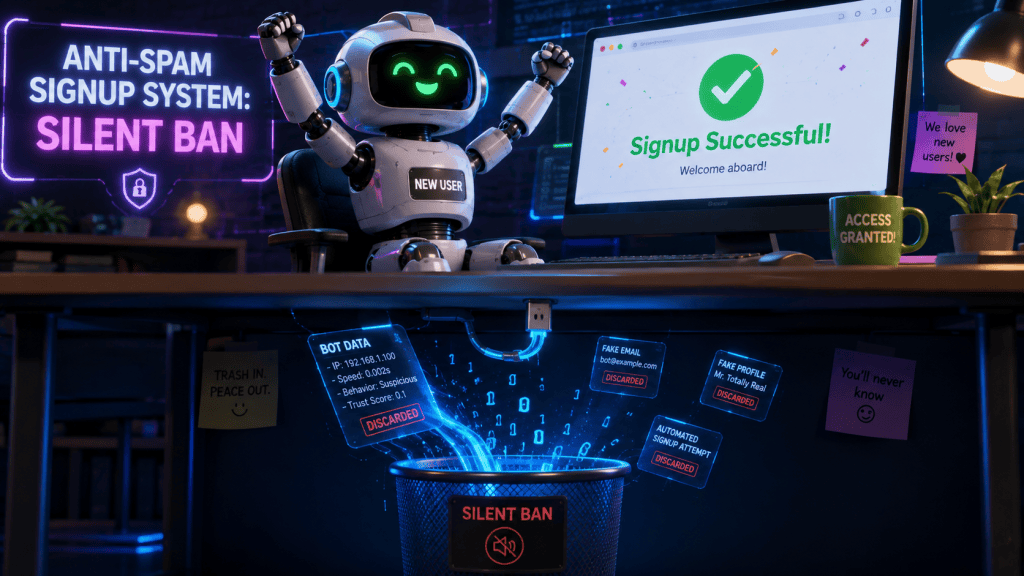
When your system detects a bot, you pretend the signup was successful. You show them a lovely green checkmark: “Thank you for signing up! Please check your email.”
But behind the scenes? You throw their data directly into the trash (or flag their account as inactive in your database so they can’t do anything).
The bot thinks it succeeded and moves on. The hacker never knows they were blocked, so they don’t try to change their tactics. It’s a beautifully sneaky psychological trick.
Hack #5: The “Silent Ban” Strategy 🤫
Automating it All with Claude-SpamDetector-Skill 🤖
If building all of this from scratch sounds like a lot of work, the developer community in 2026 has your back! (anti-spam signup system)
This is a specialized AI “skill” designed for Claude Code environments that perfectly documents and implements this exact layered system we just talked about. It acts as an automated blueprint for:
Setting up honeypots
Integrating reCAPTCHA
Running DNS validations
Implementing the weighted spam scoring logic
Designing the silent-ban architecture
And even “re-scanning” accounts later if they start acting suspicious!
If you are a developer looking to integrate an anti-spam signup system quickly, checking out open-source repositories like this one is the perfect way to fast-track your security setup. You don’t have to reinvent the wheel!
Let’s Wrap It Up! 🎁
Securing your website doesn’t have to be a scary, stressful task. By thinking like a bouncer and putting up multiple layers of security—from sneaky honeypots to silent bans—you can create an anti-spam signup system that keeps your website clean and your real users happy.
Remember:
Never rely on just one trick. Use layers!
Don’t punish humans. Keep your tests invisible.
Don’t educate the bots. Use silent bans!
If you start with these beginner-friendly hacks, you’ll be lightyears ahead of most websites out there.
What do you think? 🤔
Did you find these anti-spam hacks helpful? Which layer of the castle are you going to build first—the honeypot or the silent ban?
Let me know in the comments below, drop a like if this saved you a headache, and share this post with a friend who is tired of bot signups! 👇
Stay ahead with the latest in web development services and news. Discover expert solutions, trending tools, and insights to elevate your digital projects and skills.